> Library-O-Saurus: Chromebooks
Showing posts with label Chromebooks. Show all posts

Monday, October 21, 2019

Student-Curated Book Displays: A Practical Application of Catalog Skills

Project-based learning has a big audience in our district, but it's difficult to complete an entire PBL unit when you only see students for 55 minutes a week (or less, with assemblies and Fun Runs and field trips!). I try to incorporate as much authentic learning into my lessons as possible, and I'm suuper excited about my newest attempt: 4th grader-curated book displays using catalog skills!

I introduce Destiny in second grade, so fourth graders have had a great deal of practice finding books in our online catalog and then on the shelf. Now comes the ultimate test: a two-week project in which they have to think of keywords for a seasonal display, find books that would fit in the display using our online catalog, and then pull the books from the display and scan them into a resource list. I am SO excited about this idea and super hopeful it turns out!!

First, students will be randomly assigned one of 8 seasonal display topics that will be displayed in the next few weeks. Since I am doing this at the beginning of the year as part of library orientation / Destiny review, the displays I picked are:

  • Diwali (Oct 27 this year)
  • Bullying Prevention Month (October)
  • Disability Awareness Month (October)
  • Native American Heritage Month (November)
  • Italian American Heritage Month (October)
  • Thanksgiving
  • Veterans' Day
  • Election Day
I pull my Halloween books in the beginning of October, so this would be a little late to include Halloween for me!

I collated the copies so all 8 topics cycled through one after another, in order to distribute them evenly. Students first listed 3 key words that they could use to search for books (a throwback to 3rd grade, when we did LOTS of work around key words!), then used an iPad to search Destiny for those key words and listed at least 5 books, along with their call numbers. We regrouped to share what we'd found, and I collected the sheets for next week!

Part 2

school library catalog
The second part of this lesson came the next week, when it was time to pull the titles from the shelf! I found that I had to review all the different sections of our library, because with this kind of search, students were finding some titles in smaller sections, like our Easy Non-Fiction and Early Chapter Book sections, that they aren't as familiar with. I passed their papers back out, this time putting them into groups according to which display they were researching. Each group was responsible for finding all the books on their lists, and then one student from each group scanned the books into a Resource List. The reason I had them scan the books into the resource list is because I had to put all the books back on the shelf for the next class! I wanted to make sure every group got to pull all their books, which ended up being a lot of extra shelving for me. Worth it though, to see their pride over their own display! The resource list is important so I can make sure every group's books are all represented.
school library students searching for books for a catalog display


Centers This Week

I always like to make sure that the center work supports what we're doing in the lessons as well. The Chromebook center for these two weeks is the library game Shelver, and the writing center is a chance to create a sign to go along with their displays.

student-curated Diwali book display in the school library
student-curated book display for Disability Awareness Month in the school libraryHere are some of our finished displays: student-curated book display for Bullying Prevention Month in the school library
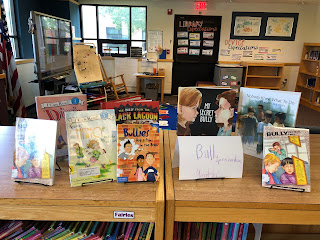

They are pumped to see their own displays up, and I'm excited that they were able to pull their own collections!

Saturday, October 12, 2019

Introducing the Mouse: A Monster Hunt!

Kindergarteners had SO much fun learning how to use a computer mouse this week with a monster hunt! Our school district recently purchased a subscription to i-Ready, a computerized curriculum for all grades, and I've been working pretty closely with teachers to make sure that students have all the skills they need in order to be successful with it. I was SUPER excited to find that they actually include a module on parts of the computer and how to use a mouse - and it's AWESOME!

The biggest cursor practice comes in the form of a game in which students move their cursor over different shapes to reveal noises, movements, animals, and, at the end, monsters! I decided to make this into a Monster Hunt, because it's getting close enough to Halloween that kids are VERY excited about all kinds of Halloween-y things!

Image result for jumpy jack and googily
We started by reading the picture book Jumpy Jack and Googily, by Meg Rosoff (and illustrated by Caldecott Medal-winning Sophie Blackall!). It's a goofy story of two best friends: Googily, a monster, and Jumpy Jack, a snail who is terrified of monsters. The illustrations are what make this book for me - every page, Jumpy Jack asks Googily to check somewhere he thinks a monster might be hiding (the shed, behind a tree, in the paddle pool) and Googily obligingly checks for him - so that, as the kids loved to point out, "NOW there's a monster!!"

I told the kids, "Now we're going to go on our own monster hunt! Do you think we'll be able to find any?" They, of course, were ready to trek around the library to find some - but then I told them we were going to be hunting for monsters on our computers. I put the word card for "cursor" on the board and asked them to find my cursor on the Smartboard. I then moved the cursor around and asked them what was happening! In each class, there were enough students who'd seen a mouse used before that they were quick to point out that my hand was moving on the mouse! I added the word "mouse" to our word wall.

I demonstrated how to hold a mouse and had 3-5 students demonstrate. Then we were ready for our monster hunt! i-Ready has a teacher version and a student version; we went through the teacher version together, patiently looking for any monsters, until we found a few at the very end. Since I have a wireless mouse, I was able to bring a flat surface (a hardcover book) and the mouse to students that were sitting quietly so they could move the cursor to the different shapes.

After introducing a few more word cards (Chromebook, screen, and keyboard), next up was independent practice - students were dismissed to tables where I had (furiously quickly in 10 minutes between classes) set up Chromebooks for them. They did their own monster hunt while I called students up to check out books.

This monster hunt is a great introduction to the mouse because it involves very minimal clicking! I find that a lot of times, kindergarteners want to press all the buttons and have a difficult time doing so - and they get distracted from actually using the mouse. Most of my students were really getting the hang of it by the end!

Image result for spider sandwichesWe wrapped up by reading another monster-themed book and a favorite in my library: Spider Sandwiches by Claire Freedman. It's a disgusting rhyming food journal of Max the monster, who loves to eat anything with bugs in it - especially spider sandwiches! Kindergarteners love to "EWWWW" at his goofy diet and gross snacks!

Sunday, September 29, 2019

Technology Expectations

Before letting anybody get their hands on our Chromebooks or iPads, I want to make sure we are all on the same page about what I expect from them. So, we need to come up with some expectations to add to our list!

Throughout the past month that we've been working together, we've been working on following our nine library expectations that apply every day (quiet voices, hands to yourself, walking feet, listening to the speaker...). Now, though, we need to fill in a new space: Device Expectations! I point to the wall where I put up the words, "Device Expectations," without any rules following.

Then, I had my fourth graders do a visual thinking routine to see where their thoughts were as to how we should be behaving with technology. I gave each student 3 sticky notes and asked them to write one rule they thought should go under "Device Expectations" on each sticky note. For the most part, they were pretty thoughtful and covered most of the rules I was thinking of anyway!


Then I put up three pieces of poster paper around the carpet area: "Protect Our Devices," "Protect Our Privacy," and "Protect Our Class Time." These were the three main categories I wanted to make sure we talked about that I thought most rules would fit into. After everyone had their three rules written down, they stuck them up on the paper they thought fit it best. I reviewed the highlights with the whole class, and made sure we covered all the big ones!

In third grade, I didn't think they were quite ready to come up with their own expectations, so I passed out one laminated rule to each group of 3-4 students where they sat on the carpet. Each group was responsible for presenting to the class what their rule meant and why it was important. Some were tougher than others, but they did a great job! Those rules will be posted up on the wall next week so they can refer back to them.


After a review of expectations, both third and fourth graders got to use the brand-new 2-in-1 Chromebooks! I directed them to our library website, where they could choose any of our Learning Links (ABCYa, Kodable, and a few other learning sites).